

Creality Falcon A1 Pro 20W Review:
The Enclosed Dual-Laser Engraver That Does It All
20W Blue Diode + Optional 2W IR · CoreXY 600 mm/s · AI Autofocus · Class 1 Safety · 268×358 mm Work Area
Over the past two years, the desktop laser engraver market has shifted dramatically. The open-frame diode machines that once dominated the space are steadily being replaced by something more capable and far more practical: fully enclosed, intelligent laser engravers that are safe enough for home use, powerful enough for a small business, and smart enough to make complex projects genuinely beginner-friendly.
The Creality Falcon A1 Pro 20W is one of the best examples of this evolution. Combining a 20W blue diode laser with a CoreXY motion system, AI-powered autofocus, an HD smart camera, a 4.3-inch touch screen, and a Class 1 safety-certified enclosure — all in a compact, pre-assembled unit under $1,100 — it's a machine that punches well above its price class.
In this review, we break down everything: build quality, cutting and engraving performance, dual-laser versatility, software, and whether the Falcon A1 Pro deserves a spot in your workshop.
Should You Buy the Creality Falcon A1 Pro 20W?
Yes — if you want a powerful, fully enclosed laser engraver that's safe at home, fast enough for small-batch production, and smart enough to handle complex projects without deep technical knowledge. The 20W laser cuts 10mm basswood and 8mm black acrylic in a single pass, and the AI autofocus + camera positioning workflow is genuinely impressive.
Consider alternatives if you need a very large work area (the 268×358mm bed is generous but not the biggest available) or if metal engraving is your primary goal — the 2W IR module needed for bare metal is sold separately and adds roughly $335 to the total.
What Is the Creality Falcon A1 Pro?
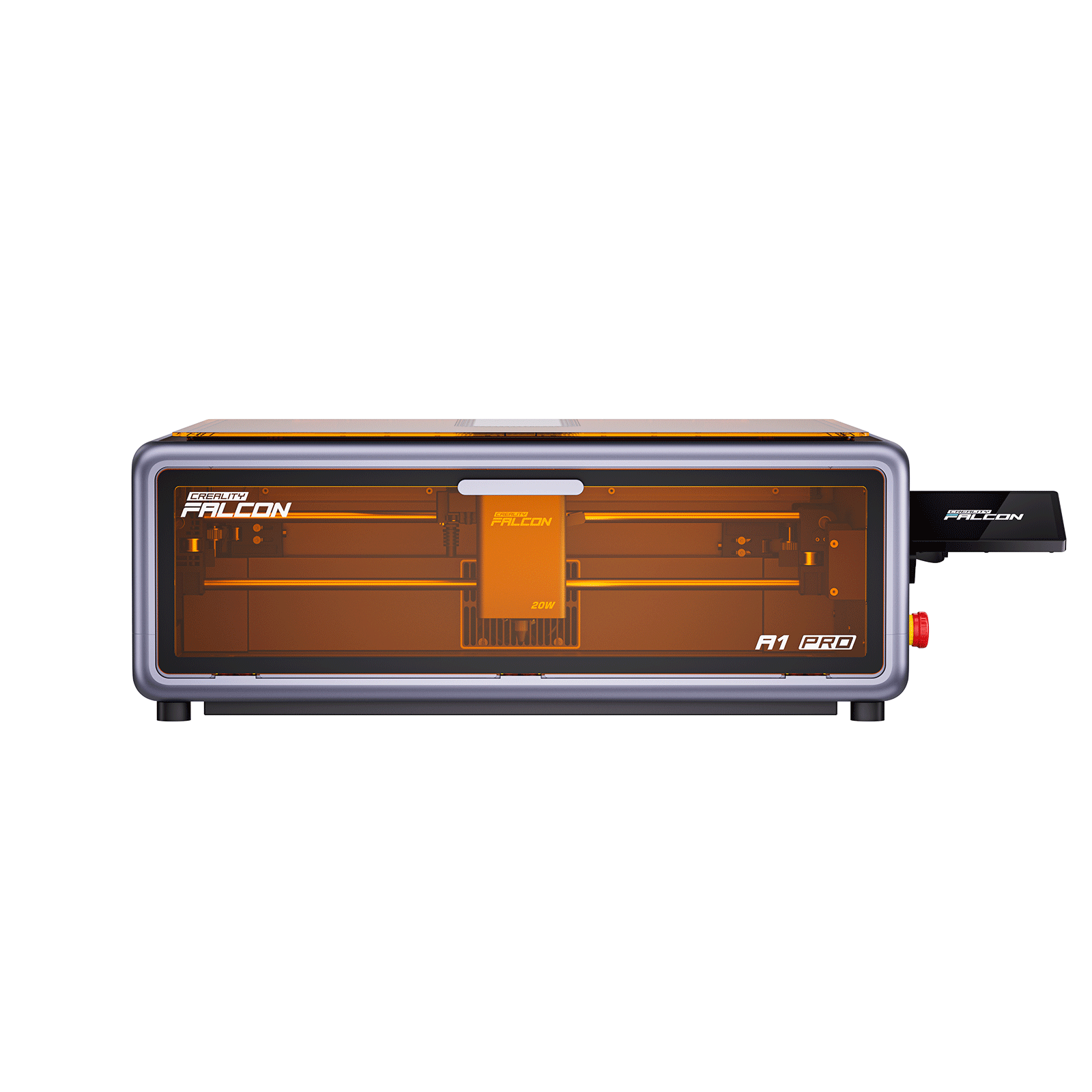
Next-Gen Enclosed Engraver
The Falcon A1 Pro is the successor to the Falcon A1 10W, bringing a substantial upgrade in laser power (20W vs 10W), motion system (CoreXY), and smart features. It arrives fully pre-assembled — just connect the power cable and air assist, run a quick calibration, and you're engraving within minutes of unboxing.
The design is distinctly Creality: a compact orange-and-black enclosure with a dual-door design for easy material access and a flip-up lid for monitoring. On the underside of the lid sits the HD smart camera, which handles auto-positioning, live project preview, and the AI-powered autofocus system.
At its heart is a 20W 455 nm blue diode laser compatible with 300+ materials. A quick-swap head mechanism lets you switch to the optional 2W infrared laser for metal and glass engraving in under a minute.
4 Standout Features
CoreXY · 600 mm/s
Borrowed directly from Creality's 3D printer expertise, the CoreXY motion system moves the laser head in a stable, vibration-free arc at up to 600 mm/s — around 3× faster than belt-driven gantry competitors.
AI Visual Autofocus
No probe sticks or manual adjustment. A red rangefinder beam hits the material surface; the camera captures the spot size; an AI algorithm calculates material thickness and adjusts Z-height automatically in about 3 seconds with <0.3mm accuracy.
Dual-Laser Swap System
Two sliding levers release the 20W blue head in seconds. Swap in the optional 2W IR (1064nm) module with its 0.03mm spot size for engraving metals, glass, ceramics, and shiny surfaces that blue diode lasers cannot mark cleanly.
8-Layer Safety Suite
Class 1 FDA-rated enclosure, flame & smoke detection, tilt/drop emergency stop, airflow monitoring, lid auto-stop, key lock, and a physical emergency button. No goggles required. Safe for home, studio, and classroom use.
Full Specification Table
| Specification | Creality Falcon A1 Pro 20W |
|---|---|
| Blue Laser Power | 20W · 455±5 nm |
| Optional IR Laser | 2W · 1064 nm (sold separately) |
| IR Laser Spot Size | 0.03 × 0.03 mm |
| Max Engraving Speed | 600 mm/s (CoreXY) |
| Work Area | 268 × 358 mm |
| Machine Dimensions | 567 × 468 × 211 mm (685mm with screen) |
| Net Weight | 16.8 kg |
| Autofocus Speed | ~3 seconds · <0.3 mm accuracy |
| Camera | HD smart camera · real-time preview · batch positioning |
| Display | 4.3" color touch screen |
| Connectivity | Wi-Fi · USB · TF card · App (iOS/Android) |
| Air Assist | Built-in pump · auto-activates during work |
| Exhaust | 2" rear port · built-in fan (purifier optional) |
| Safety Class | Class 1 (FDA) · 8-layer protection |
| Software | Falcon Design Space · LightBurn · LaserGRBL |
| OS Support | Windows · macOS · iOS · Android |
| Input Voltage | 100–240 V ~ 50/60 Hz · DC 24V 7.5A |
| Cutting Capacity (Blue) | 10 mm basswood · 8 mm black acrylic (single pass) |
Real-World Performance
Cutting: Impressive 20W Results

The 20W blue diode laser is genuinely powerful. In testing by multiple independent reviewers, it cuts 10mm basswood and 8mm black acrylic in a single pass — a result that would require 2–3 passes on older 10W machines. Edges on acrylic cuts are polished and rarely need post-processing.
For 3mm plywood, the default cutting speed is 550 mm/min, producing clean, crisp edges. For reference, the default engraving fill speed is set at 6,000 mm/min — fast enough for detailed artwork without sacrificing quality.
One reviewer note worth flagging: the autofocus tends to set the focal point 1–2mm higher than optimal for thick-material cutting. For engraving, this is perfect. For cutting materials over 4mm, a quick manual Z-axis adjustment using the included calibration wedge gives cleaner results.
Engraving: Detail & Photo Quality
Photo engraving performance on basswood is among the best in the under-$1,000 category. Grayscale portraits maintain tonal gradients cleanly, and text down to 8-point font remains clearly readable on wood surfaces. The CoreXY system's lack of vibration at high speeds is a key reason for the consistency.
Leather engraving produces deep, permanent marks without burn-through. Slate coasters engraved with the default preset take around 14 minutes and produce consistently high-quality results across the uneven stone surface.
The Smart Fill batch tool in Falcon Design Space automatically copies and rotates a design across multiple workpieces in a single build — a genuine time-saver for production runs like keychains, tags, and small custom items.

2W IR Module: Metal & Glass Engraving
The optional 2W infrared laser (1064nm) opens the machine's material range dramatically. With a 0.03×0.03mm spot size — significantly finer than the 20W blue module — it's capable of engraving stainless steel jewelry, aluminum business cards, and glass with professional-quality results.
Compatible Materials
Creality claims 300+ compatible materials across the two laser heads. In practice, the most commonly used materials are:
The 20W blue laser handles all organic and coated materials with ease. For bare metal, shiny surfaces, and glass, the 2W IR module is the right tool — its 1064nm wavelength is absorbed by metals in a way that 455nm blue light is not.
Software: Falcon Design Space & LightBurn

Falcon Design Space
Creality's dedicated software handles the full workflow from design to job. Key features worth highlighting for the A1 Pro experience:
- Camera live preview — drag and drop designs directly onto the camera view of the material
- Auto material parameters — select material type and optimal speed/power load instantly
- Smart Fill batch tool — auto-tile designs across multiple workpieces
- One-click camera calibration — engraves 5 alignment circles, "connect the dots" to dial in
- Mobile app (iOS & Android) — start jobs, monitor via camera, control remotely
- LightBurn & LaserGRBL compatible — full professional control for advanced users
Setup & Day-to-Day Use
Setup from unboxing to first cut takes under 30 minutes for most users. Everything — air assist pump, exhaust tube, power cable, touch screen arm — fits neatly inside the machine during shipping. No partial assembly required. The setup process involves connecting the power cable, attaching the air assist hose, installing the exhaust tubing to the rear port, snapping in the touch screen arm, and running the initial calibration sequence.
Day-to-day workflow is notably streamlined. The camera-based auto-positioning means you skip the tedious manual alignment process that plagues most open-frame engravers. For repeat production jobs, the batch mode and Smart Fill tool are genuine time-savers.
The dual-door design is a thoughtful touch: one door provides access from the front for material loading, while the second allows you to observe the laser from a safe angle during operation — without interrupting the job.
Pros & Cons
✅ What We Love
- 20W cuts 10mm basswood and 8mm acrylic in a single pass
- CoreXY delivers 600 mm/s with minimal vibration
- AI autofocus in ~3 seconds, no manual probing
- HD smart camera for drag-and-drop job positioning
- Fully pre-assembled — ready in under 30 minutes
- Class 1 safety — no goggles, safe for home and classroom
- 8-layer protection: flame detection, tilt-stop, airflow monitoring
- Quick-swap laser head in under 1 minute
- 4.3" touch screen for offline operation
- Dual-door design for easy access and monitoring
- LightBurn + LaserGRBL compatible
⚠️ Limitations to Know
- 2W IR module for metal/glass sold separately (~$335 extra)
- 268×358mm work area smaller than open-frame gantry machines
- Autofocus positions 1–2mm high for thick cutting — manual override needed
- No built-in fume extractor — exhaust ducting or external purifier required
- At 16.8kg, not truly portable compared to mini engravers
- Some user reports of slow order support response times
Who Is the Falcon A1 Pro Best For?
Home Hobbyists
Class 1 safety and full enclosure make this genuinely safe on a home desk or in a garage. The one-click workflow means less time learning, more time creating.
Small Business Owners
Personalized gifts, custom signage, wedding decor, tumblers — the 600mm/s speed and batch Smart Fill tool support small production runs without bottleneck.
Craft Sellers (Etsy / Local)
Wide material support (wood, acrylic, leather, slate, metal with IR) means a single machine covers most popular product categories for craft marketplace sellers.
Product Prototypers
Precision engraving, clean acrylic cutting, and LightBurn compatibility make the A1 Pro a capable prototyping tool for product designers working with flat materials.
Makerspaces & Schools
The Class 1 safety rating, key lock, and fully enclosed design make this appropriate for classroom and makerspace environments where multiple users share the machine.
Upgraders from Open-Frame
If you've outgrown an entry-level open-frame machine and want safety, power, and automation without spending $2,000+, the A1 Pro is the logical next step.
Is the Falcon A1 Pro Right for You?
🏆 Choose the Falcon A1 Pro if:
- Safety and enclosure are non-negotiable (home, family, classroom)
- You want a fast, production-capable machine under $1,100
- Autofocus and smart camera automation appeal to your workflow
- You work primarily with wood, acrylic, leather, and similar materials
- You value pre-assembled, plug-and-play setup
- You may add the IR module for metal later as your skills grow
⚡ Consider other options if:
- You need a very large work area (500mm+ bed) for big panels
- Metal engraving is your primary use case from day one
- Portability is essential — at 16.8kg, this stays on a desk
- Budget is tight and an open-frame machine would suffice
- You need industrial-grade cutting thickness (10mm+ consistently)
The Creality Falcon A1 Pro: Raises the Bar for Sub-$1,100 Enclosed Lasers
The Falcon A1 Pro 20W is the most complete enclosed desktop laser engraver available under $1,100. Creality brought genuine innovations to this price point — CoreXY mechanics, AI autofocus, HD camera positioning, a dual-laser swap system, and Class 1 safety — in a machine that arrives ready to use out of the box. Whether you're a hobbyist exploring laser crafts, a small-business owner running production batches, or a makerspace looking for a safe shared machine, the A1 Pro earns its place. The IR module's additional cost is the main caveat, but even as a standalone 20W engraver/cutter, the value proposition is hard to beat.
Frequently Asked Questions
Ready to Find Your Next Laser Engraver?
Browse our full range of enclosed and open-frame laser engravers — from compact beginner machines to professional-grade cutters — and find the right fit for your budget and workflow.
Shop Laser Engravers


